Application Menu
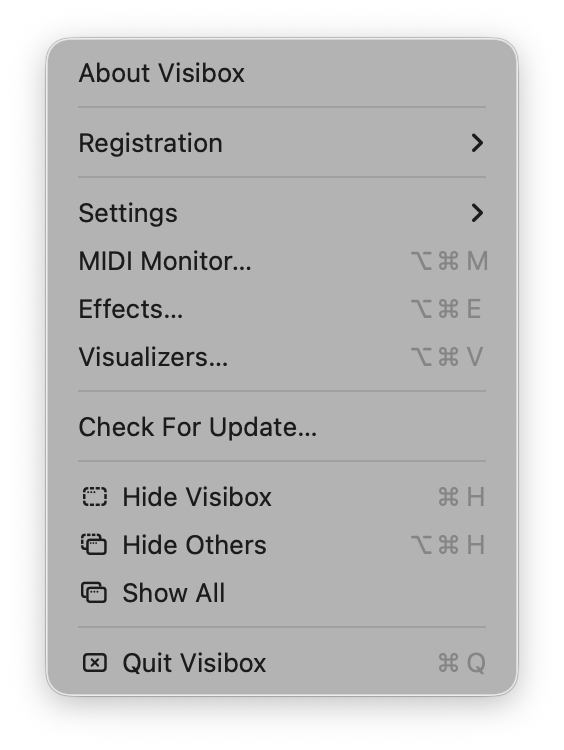
The Visibox application menu contains functions related to the application itself, such as registration, settings, editor windows, updates, and Quit.
Displays information about the current version of Visibox.
This handles matters related to registration and authorization. It’s where you can purchase a Pro plan subscription or license and manage your account.
Free Plan: Visibox is free to use with feature limitations. Many menu items will show lock icons indicating Pro features. The free plan allows unlimited use but with restricted functionality and a watermark on the Output.
14-Day Trial: All new users get 14 days to try Pro features with a watermark on the output. After the trial, Visibox reverts to the free plan unless you upgrade to a Pro Plan.
Pro Plan: Pro plans unlock all features and remove the watermark.
A submenu containing the Settings window plus several API- and device-related actions.
Opens the Settings window, the central place to configure audio, devices, output, displays, language, and general preferences.
Opens the MIDI Map window for configuring note and CC assignments.
Opens the Remote Pairing window for pairing remote devices and AI tools.
Scans for installed AI tools on your machine and registers Visibox’s MCP server with each. See AI Assistants for what you can do after connecting.
Installs the visibox command-line tool for shell scripting. See Command Line Interface.
Opens the MIDI Monitor window for troubleshooting MIDI connections.
Opens the Effects Editor window for browsing, creating, and customizing Effects.
Opens the Visualizers Editor window for browsing, creating, and customizing Visualizer presets.
Checks to see if a newer version of Visibox is available.
Standard macOS hide command.
Hides all other application windows.
Shows all hidden application windows.
Quits Visibox.